
In brief
The official e-filing portal is the starting point for your tax records and notices. You should be able to review a professional’s proposed submission and its assumptions, and receive the acknowledgement after filing.
Start with Income Tax Department: Non-resident individual filing guidance (opens in a new tab)
Keep citizenship, tax residence and FEMA residence separate
These labels answer different questions. Your nationality or OCI card does not alone determine the year’s Indian tax treatment. Establish the relevant year, travel history, income sources and exceptions.
Your next steps
0 of 5 steps complete · Next: Access your own tax account
Access your own tax account
Next stepUse the official portal and your own secure credentials. Do not hand over control of your email or phone.
Collect the full income picture
Include Indian bank interest, rent, investments, sales and the overseas facts relevant to residency.
Match reported amounts
Ask your CA to reconcile the available information statements, withholding records and your own statements.
Read the draft or response
Request the selected return form, computation, disclosures and explanation of material choices before submission.
Retain the outcome
Save acknowledgements, verification evidence and a dated copy of the filing or response. For a notice, confirm the exact response deadline.
Suggested preparation sequence. Your authority may require a different order. Progress stays on this device.
What to have ready
0 of 4 preparedKeep documents in your own secure records. Tick what you have; nothing is uploaded.
Model the decision with your own figures
Prepare the dates, currencies, costs and amounts you know. Keep tax eligibility, provider access and uncertain assumptions on your adviser’s question list. The calculators show those assumptions explicitly.
For a return to India, add education, parents’ support, healthcare, partner income and locked funds to the household timeline. Bring supporting-tool figures into it only after reviewing timing, currency and overlap.
Recognise the official form
Preview before you visit the official portal. Do not enter or upload personal information here.
 Enlarge preview ↗
Official online screen example
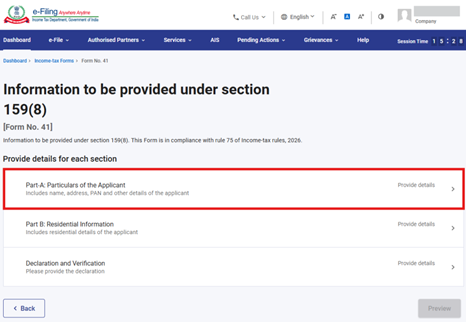
Form 41 · Treaty information
The department’s manual shows the online form for prescribed information supporting a non-resident’s treaty-relief claim under section 159 and Rule 75.
What you will see on the form
Part A: applicant particulars · Part B: residential information · Declaration and verification
This is a screenshot from the official manual, not a blank paper form or proof of eligibility. Confirm the tax year and applicable Act with your CA. Filing is online through the official e-Filing portal.
Income Tax Department · Source checked 5 September 2026
Questions to take to an adviser
- Why is this the correct form for my facts?
- What differences from tax-account information remain unresolved?
- What has been filed, verified and acknowledged?
Who can help
A CA; obtain prompt advice for notices, missed deadlines or disputed assessments.
Check an adviser before paying or signingSources & review limits
Published by NRIdisha. Prepared with AI assistance. No individual author or qualified professional reviewer is credited for this guide.
Official sources support the statements they address. They do not certify this guide or your eligibility. Open the source and check current amendments before acting.
Income Tax Department (opens in a new tab) · Reserve Bank of India (opens in a new tab) · National Portal of India (opens in a new tab)
Return guidance for AY 2026–27. Check the period before using its section references.
Current filing forms, notices, tax records and taxpayer guidance.
Keep this page’s title, the exact statement and the official source. Email them to support@nridisha.com. Do not include personal documents.